
Buying guide
USB-C chargers for laptops and everyday devices
By CompareVolt
Choose Anker for a higher-power laptop and extra ports, Belkin for a documented two-device split, or Cygnett for a desktop brick with an included USB-C lead or a slim wall charger. Match the occupied-port output to your devices.
The shortlist
Choose for the way you’ll use it.
Options for different needs, based on manufacturer specifications and seller offers. We haven’t tested them hands-on.
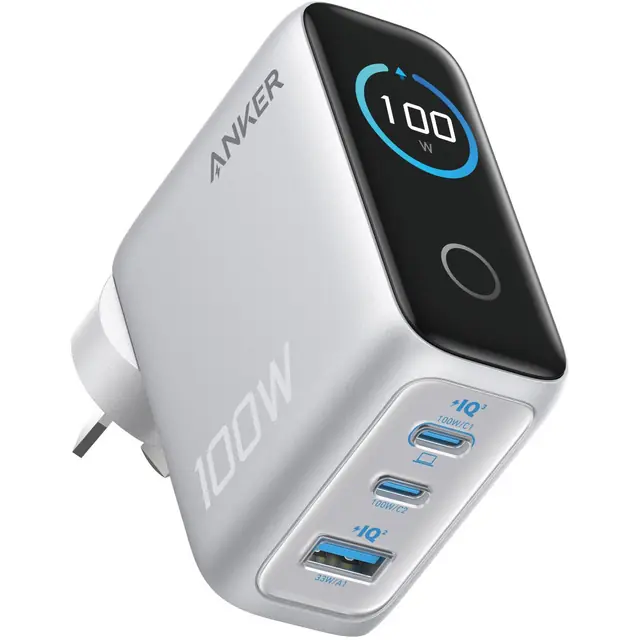
The first USB-C port supports up to 100W alone, with two USB-C ports and USB-A for a mixed setup. The display reports charging information.
- USB-C1 alone
- Up to 100W
- Ports
- 2 USB-C + 1 USB-A
- Warranty
- JB: 1 year; AU policy differs
The trade-off: Occupied ports share power; the three-port diagram gives 80W + 12W + 7.5W. Second-port documentation conflicts; cable inclusion needs confirmation.
Listed price
Price perspective: A$119.95
Silver A121BT41 Australian-plug charger; confirm cable contents. · Checked
Price details +
Displayed Australian seller price checked 12 October 2026; additional costs noted below.
Price source ↗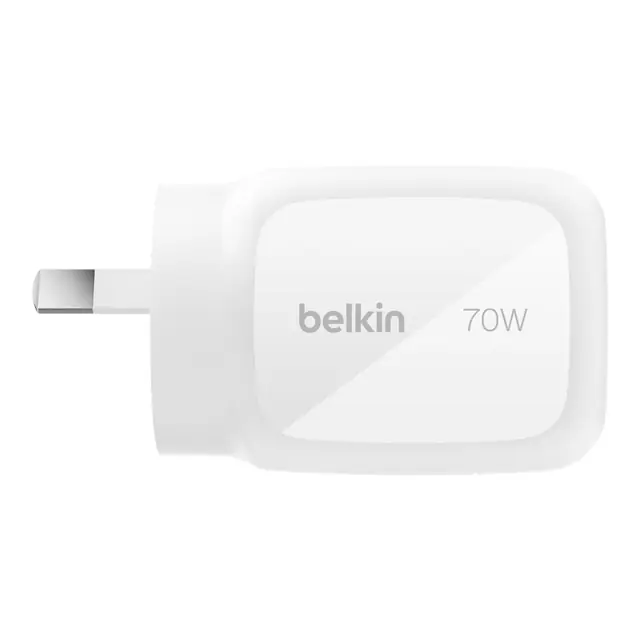
A useful lower-cost three-port choice when a laptop needs no more than 45W while the second USB-C device charges.
- USB-C alone
- Up to 70W
- Two USB-C
- 45W + 25W
- Warranty
- 2 years
The trade-off: A single USB-C port reaches 70W, but two USB-C devices split 45W + 25W. Charging cables are separate.
Listed price
Price perspective: A$79.95
White WCH018AUWH AU-plug charger; no charging cable included. · Checked
Price details +
Displayed Australian seller price checked 12 October 2026; additional costs noted below.
Price source ↗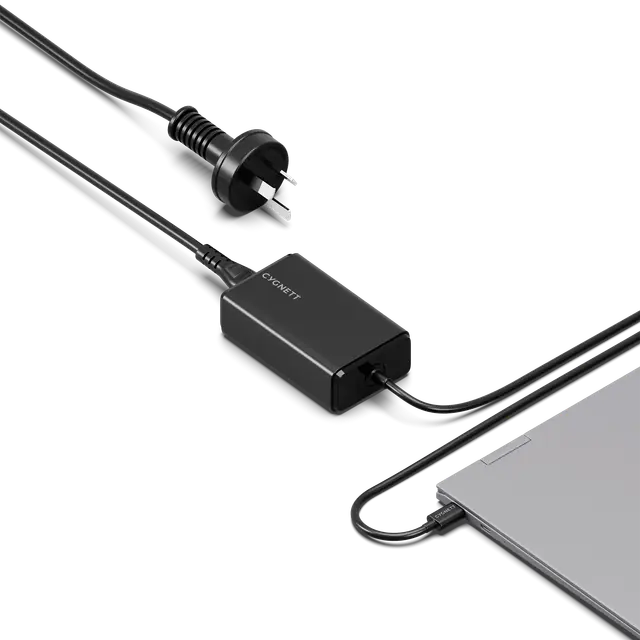
For one device and an included lead
Cygnett PowerMaxx CY5071PDWCH 65W
65W desktop brick with an integrated 1m USB-C lead
A separate desktop power brick with an AU mains lead and an integrated one-metre USB-C cable for one compatible device.
- USB-C output
- 65W maximum
- Cable
- Integrated 1m
- Connections
- One device
The trade-off: One device only; the USB-C lead is fixed to the brick. Mains-lead length and detachability are unconfirmed. Product and seller list five years; Cygnett’s generic FAQ says two, so obtain written warranty terms.
Listed price
Price perspective: A$74
Black CY5071PDWCH desktop brick with AU mains lead and integrated 1m USB-C cable; mains-lead length and detachability unconfirmed. · Checked
Price details +
Displayed Australian seller price checked 12 October 2026; additional costs noted below.
Price source ↗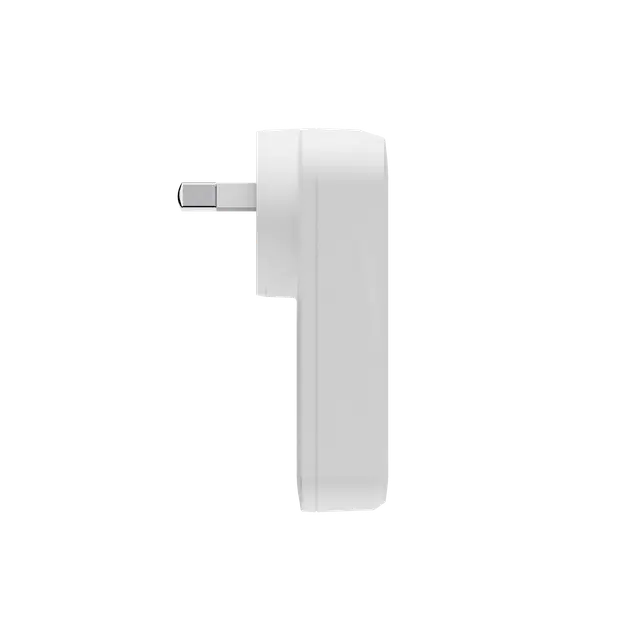
Consider it where charger depth matters and you prefer detachable cables. One port supports up to 65W.
- One USB-C
- 65W maximum
- Ports
- 2 USB-C
- Package
- Charger only
The trade-off: Two-device output is below 65W, and the maker’s split table is inconsistent. Cables are separate; the five-year product warranty conflicts with the generic two-year FAQ.
Listed price
Price perspective: A$74.95
White CY5488PDWCH Australian-plug charger; USB-C cables separate. · Checked
Price details +
Displayed Australian seller price checked 12 October 2026; additional costs noted below.
Price source ↗How we chose these options
How we compared
Reviewed
- Evidence basis
- Australian seller offers and manufacturer specifications reopened 12 October 2026. Research comparison; no hands-on tests.
- Coverage
- Three Australian wall-plug models and one desktop power brick across three brands, including the newer Anker display model and Cygnett slim two-port alternative.
- Limitations
- A focused current Australian shortlist, not a whole-market ranking. Charging speed, occupied-port performance, temperature and reliability have not been measured. Product photos show the identified models; the cover is contextual.
Choose by the laptop, then the other ports
Start with Anker A121BT41 for a compatible laptop needing up to 100W on the first USB-C port. Belkin WCH018AUWH suits a lower power budget with a documented 45W + 25W dual-USB-C split. Cygnett’s PowerMaxx is a separate desktop brick with an AU mains lead and fixed USB-C cable for one device; ChargePlus has a slim body and two detachable cable connections.
Read your laptop’s accepted USB-C charging input before choosing. A charger’s headline wattage does not promise that output at every occupied port. These are specification-based suggestions from a focused Australian retailer sweep, with no measured charging-speed or temperature tests.
Australian prices and package differences
| Exact model | Store / displayed AUD price | Power and package |
|---|---|---|
| Anker A121BT41 silver | JB Hi-Fi — A$119.95 | 100W total; 2 USB-C + USB-A; cable contents to confirm |
| Belkin WCH018AUWH white | JB Hi-Fi — A$79.95 | 70W single USB-C; 45W + 25W dual USB-C; no cable |
| Cygnett CY5071PDWCH black | JB Hi-Fi — A$74 | 65W desktop brick; AU mains lead + integrated 1m USB-C lead; one device |
| Cygnett CY5488PDWCH white | JB Hi-Fi — A$74.95 | 65W single USB-C; two ports; cables separate |
The amounts above are displayed Australian retail prices for these exact colours and models. Compare the complete setup cost: a cheaper adapter plus a suitable USB-C cable can cost more than an integrated-cable model. JB’s consumer terms include GST. Allow for the final freight charge.
The details that change the purchase
Anker A121BT41 — use the first USB-C port for the laptop
JB Hi-Fi’s exact AU model is the silver display-equipped A121BT41, rather than the older A2688 previously covered here. Its A121B support diagram shows 70W + 30W with two USB-C devices and 80W + 12W + 7.5W with all three ports. A 95W + 5W mode has conditions; do not plan two demanding devices around that split.
The written profile table limits USB-C2 to 20V/3.5A, while the diagram and seller photograph label that port 100W. Confirm the AU unit’s second-port rating if it matters; the first port’s 20V/5A profile is documented. JB lists a one-year manufacturer warranty. Anker’s Australian policy lists 18 months for standard chargers and 24 months for specified tiers, with dealer terms able to differ. The applicable A121BT41 tier and JB purchase coverage are unconfirmed; obtain written terms. Ask about cable contents and use a suitable 5A USB-C cable for 100W.
Belkin WCH018AUWH — clearer two-device allocation
Belkin’s support specifications include the AU suffix: either USB-C port alone reaches 70W at 20V/3.5A; two USB-C devices share 45W + 25W. USB-C plus USB-A is listed at 45W + 22.5W. The published all-port total is 69W, but the individual three-device allocation is not established in the retained support table.
The Australian product page states a two-year warranty and names only the charger in the package. Keep the JB receipt for the Australian seller claim route. This model is a better fit for a modest laptop-plus-phone load than a laptop requiring the full 70W while another USB-C device is connected.
Cygnett CY5071PDWCH — the cable is part of the choice
The Australian PowerMaxx page shows a separate desktop power brick connected to the wall by an AU mains lead. It documents 20V/3.25A for 65W and an integrated one-metre USB-C lead from the brick to the device. The USB-C cable cannot be swapped for a longer one and there is no second charging port. Mains-lead length and detachability are unconfirmed, so the one-metre USB-C lead does not establish total wall-to-device reach.
JB Hi-Fi and the model-specific manufacturer table list five years. Cygnett’s generic FAQ on the same page instead says two years for most products. Obtain the applicable written terms for CY5071PDWCH and retain the receipt; the maker directs authorised-retailer warranty claims to the original seller.
Cygnett CY5488PDWCH — choose for depth, check shared power
The AU-white ChargePlus page describes a slim two-port charger with 65W at one USB-C port. The box list contains the charger, manual and warranty card; budget for USB-C cables.
Its simultaneous-output entry says 40W + 15W but labels the total 52W. Those figures do not agree, so ask Cygnett to confirm the actual split for this SKU before relying on two-device laptop charging. As with PowerMaxx, the product table and JB list five years while the generic FAQ says two. Ask the seller to confirm the model’s warranty in writing.
Plan the complete charging setup
Check voltage as well as watts. A laptop may need a particular USB Power Delivery profile, and a cable can limit the current even when the adapter supports more. Keep the laptop’s original adapter until USB-C compatibility is established. For a 100W connection, use a correctly rated 5A cable; choose enough length to reach without straining the socket or laptop port.
Decide which ports will be occupied together. Anker’s three-port split leaves much less power for the second USB-C device. Belkin’s 45W laptop allocation may suit light work but may not replace a higher-power original supply. Cygnett PowerMaxx avoids sharing entirely, while ChargePlus needs clarification of its two-port table.
Check the exact Australian unit
Match the complete model suffix, plug, colour and package to the linked seller page. Check socket clearance, a written cable list, the warranty applicable to that SKU and the final invoice total. A travel-friendly description does not supply overseas plug adapters. The prices are dated observations, so revisit the exact store link when ready to order.
Check how we compare
Our buying guides explain the evidence behind each recommendation.
Our methodologyPrimary sources (12)
- JB Hi-Fi — consumer prices and freight termsRetailer offerwww.jbhifi.com.au/pages/help-and-support/Terms-of-saleSource checked
- Anker Australia — warranty periods and dealer-policy qualificationsManufacturerwww.anker.com/au/policies/refund-policySource checked
- JB Hi-Fi — Anker A121BT41 100W silverRetailer offerwww.jbhifi.com.au/products/anker-100w-gan-wall-charger-silverSource checked
- Anker — A121B output profiles and user-guide familyManufacturerservice.anker.com/product-description/a08J1000000Ym4IIASSource checked
- Anker — A121B occupied-port output diagramManufacturerservice.anker.com/article-description/The-Power-output-distribution-of-Anker-Charger-100W-3-Ports-Smart-DisplaySource checked
- JB Hi-Fi — Belkin WCH018AUWH 70WRetailer offerwww.jbhifi.com.au/products/belkin-boostcharge-pro-3-port-70w-gan-wall-chargerSource checked
- Belkin Australia — WCH018auWH package and warrantyManufacturerwww.belkin.com/au/p/3-port-gan-wall-charger-70w/WCH018auWH.htmlSource checked
- Belkin — WCH018 specifications covering AU SKUManufacturerwww.belkin.com/hk/en/support-article/?articleNum=337432Source checked
- JB Hi-Fi — Cygnett CY5071PDWCH blackRetailer offerwww.jbhifi.com.au/products/cygnett-powermaxx-65w-gan-usb-c-laptop-charger-blackSource checked
- Cygnett Australia — PowerMaxx CY5071PDWCHManufacturerwww.cygnett.com/products/powermaxx-65w-gan-usb-c-laptop-charger-blackSource checked
- JB Hi-Fi — Cygnett CY5488PDWCH whiteRetailer offerwww.jbhifi.com.au/products/cygnett-chargeplus-dual-usb-c-slim-wall-charger-65wSource checked
- Cygnett Australia — ChargePlus CY5488PDWCHManufacturerwww.cygnett.com/products/chargeplus-dual-usb-c-slim-wall-charger-65w-au-whiteSource checked