
Buying guide
Laptop-capable power banks for Australian buyers
By CompareVolt
Choose Anker 737 for a compatible laptop that needs more than 100W, current Anker 25K 165W for built-in cables within 100W, Belkin BPB020 for a laptop within 65W, or Cygnett Encore for a documented 45W laptop plus 20W phone split.
The shortlist
Choose for the way you’ll use it.
Options for different needs, based on manufacturer specifications and seller offers. We haven’t tested them hands-on.
For a laptop above 100W
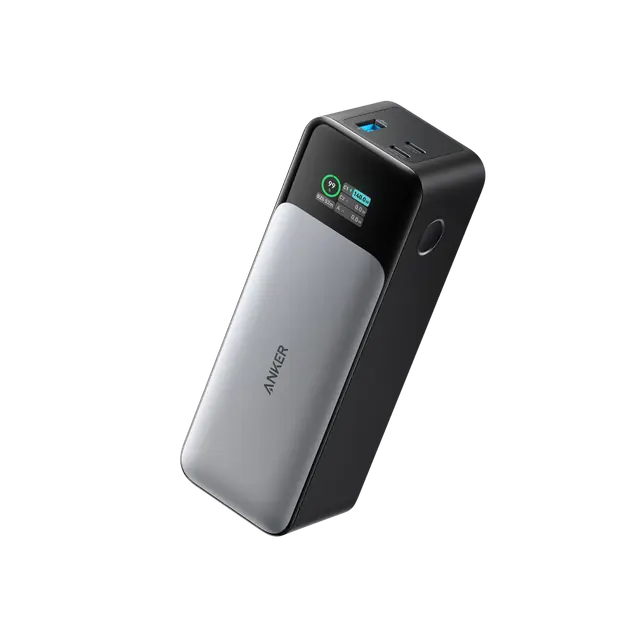
Anker 737 A1289, Black
140W single-port headroom for compatible PD 3.1 laptops
Its 28V/5A profile supports up to 140W when the laptop and cable negotiate that mode.
- USB-C ceiling
- 140W
- Capacity claim
- 24,000mAh
- Stated warranty
- 24 months
The trade-off: Older model, about 630g; total 140W is shared and included cable descriptions conflict.
Sale price
Price perspective: A$139.99
Manufacturer reference: A$219.99
Bank with included cable (type unresolved); suitable PD 3.1 cable/charger may be extra; GST unconfirmed; advertised free AU shipping subject to restrictions · Checked
Price details +
A$139.99 with the displayed auto-applied code; manufacturer reference A$219.99. Check code eligibility.
Price source ↗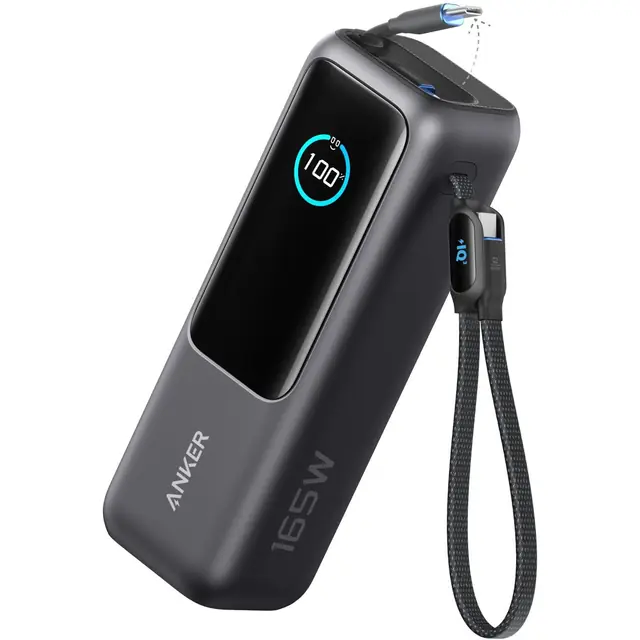
For built-in USB-C cables
Anker 25K 165W (A1695H11), Black
A current cable-integrated option for laptops within 100W
Integrated retractable and loop cables reduce the number of separate leads you need to carry.
- Single USB-C
- 100W
- Dual-device total
- 165W
- Stated mass
- 595g
The trade-off: 165W is combined two-device output; one laptop is capped at 100W.
Listed price
Price perspective: A$199.95
Black 25K bank with two built-in cables; mains charger extra; GST included; freight extra · Checked
For a laptop within 65W
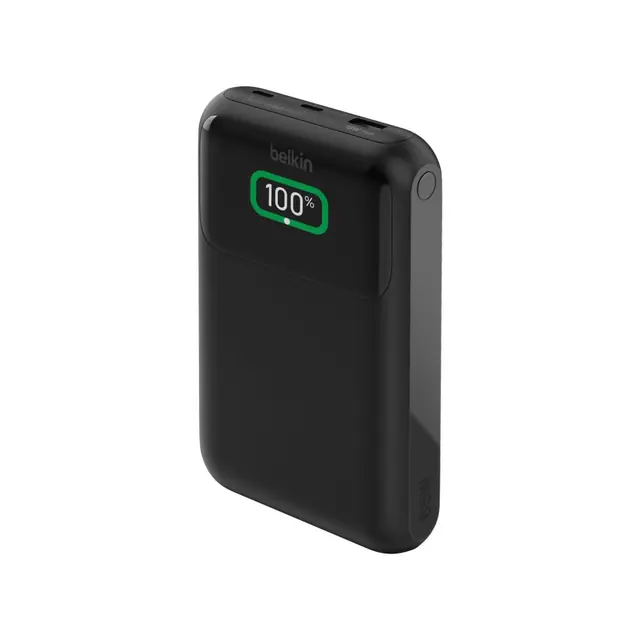
Belkin BoostCharge Pro 20K (BPB020btBK)
A three-port option for one compatible laptop
The documented single USB-C ceiling fits a laptop that accepts no more than 65W.
- Single USB-C
- 65W
- Internal capacity
- 19,200mAh
- Stated warranty
- 2 years
The trade-off: Bundled cable is rated 60W; budget a suitable 5A cable to seek the full 65W.
Listed price
Price perspective: A$159.95
Black bank with 60cm USB-C cable; 5A cable may be extra; mains charger extra; GST included; freight extra · Checked
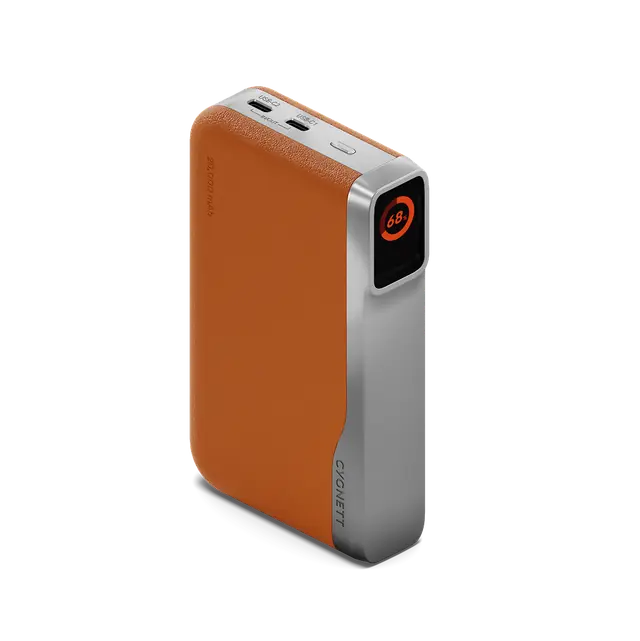
For a 45W laptop and 20W phone
Cygnett Encore 65W 20K (CY5631PBCHE), Tan
A documented split between two USB-C devices
Cygnett specifies 45W + 20W when both USB-C ports are used, for devices that accept those profiles.
- Single USB-C
- 65W
- C1+C2 split
- 45W+20W
- Cell energy claim
- 73Wh
The trade-off: The laptop ceiling falls from 65W to 45W when sharing those ports.
Listed price
Price perspective: A$169.95
Tan bank with 1m USB-C cable; confirm cable rating; mains charger extra; GST included; freight extra · Checked
How we chose these options
How we compared
Reviewed
- Evidence basis
- Australian seller pages, manufacturer specifications, regional manuals and warranty terms rechecked 12 October 2026. These are researched recommendations; we have not measured performance or owned the products.
- Coverage
- Four selected laptop-capable Australian configurations: Anker 737 A1289, Anker 25K A1695H11, Belkin BPB020btBK and Cygnett CY5631PBCHE.
- Limitations
- No measured capacity, charging speed, endurance or value winner. Advertised combined output is not a single-port rating; laptop profiles, cable limits and shared output determine compatibility.
Match the laptop first
Choose a bank from your laptop’s accepted USB-C power profile, then check the cable. The Anker 737 has a specific role for compatible PD 3.1 laptops above 100W. The newer Anker 25K 165W adds two integrated cables but caps one device at 100W. Belkin BPB020 and Cygnett Encore suit lower-power laptops; Cygnett documents a useful 45W + 20W split for two USB-C devices.
These are selected Australian buying options, with exact seller and model links. We researched current retailer ranges and manufacturer documents, including newer Anker and Cygnett options. We retained the older 737 because its 140W single-port profile serves a different need from the newer cable-integrated bank. We have not tested usable energy, charging speed or long-term reliability.
Dated Australian seller prices
| Exact model / seller | Displayed price | Material extra |
|---|---|---|
| Anker 737 A1289 · Anker Australia | A$139.99 with auto-applied code | PD 3.1 charger/cable if required |
| Anker 25K A1695H11 · JB Hi-Fi | A$199.95 | Mains charger |
| Belkin BPB020btBK · JB Hi-Fi | A$159.95 | 5A cable for full 65W; charger |
| Cygnett CY5631PBCHE · JB Hi-Fi | A$169.95 | Charger; confirm supplied cable rating |
Anker displays A$219.99 as the 737’s reference and A$139.99 with an automatic code; confirm the code at checkout. The other three amounts match current manufacturer displays for these models. JB’s consumer terms include GST; freight depends on the order. Anker’s GST basis remains unconfirmed, so check its itemised total. Anker advertises free Australian shipping, subject to address and product restrictions.
Model checks before you order
Anker 737: more headroom, with the right profile
Anker’s AU support document specifies a 28V/5A mode, 140W maximum input/output and 24 months’ warranty. A laptop limited to 100W will not charge at 140W because this bank can offer it. The current Australian listing puts its weight at about 630g, which matters if you only need a phone top-up.
The manufacturer’s cable descriptions conflict between its support and collection material. Confirm the actual included lead. For 140W, budget a compatible PD 3.1 cable and charger if you do not already own them; the bank price does not include a mains charger. For a direct-store claim, retain the order/receipt and serial number and use Anker’s Australian warranty process.
Anker 25K: built-in cables, 100W per device
JB Hi-Fi identifies the black model as A1695H11 and states a two-year manufacturer warranty. Its retractable USB-C cable and second loop cable can simplify your bag. Anker’s AU specifications give 100W per USB-C output, 165W for two devices combined and 130W total for three or four devices. The 165W product name does not describe a 165W laptop port.
Anker states 595g. A damaged integrated cable is less straightforward to replace than a separate lead, so consider whether that convenience fits how you travel. A suitable mains charger remains extra. Keep the JB receipt and approach JB about a fault; confirm the exact supplied accessories and manufacturer claim terms for this SKU.
Belkin: the supplied cable limits the full rating
Belkin’s BPB020btBK page specifies 65W from one USB-C port and rates the included 60cm USB-C cable at 60W. To seek the full 65W, obtain a suitable 5A-rated cable and confirm your laptop’s accepted profile. Adding other devices reduces available output; we do not treat the headline rating as available independently from every port.
The marketed 20K name is not a measured usable-capacity result: Belkin’s disclaimer states 19,200mAh internal capacity. JB’s exact black SKU includes the 60cm lead and lists a two-year manufacturer warranty. The mains charger is extra. Keep the receipt and start a fault claim with JB; do not infer connected-equipment compensation from a general marketing badge.
Cygnett: a documented split for two USB-C devices
Cygnett’s specification tab states 65W with one USB-C port and 45W + 20W across C1+C2. That makes the Tan Encore a reasonable fit for a laptop accepting 45W while a phone uses the second port. It is the exact CY5631PBCHE listed by JB Hi-Fi, with a 1m USB-C cable, user manual and warranty card.
Confirm the supplied cable’s rating before relying on 65W and budget a mains charger separately. Cygnett’s product weight fields are inconsistent, so we do not rank this model by weight. Its warranty policy provides two years for consumer purchases, subject to proof of purchase and intact identification; commercial coverage is three months. Start a claim with JB Hi-Fi; contact Cygnett Care if the retailer is unreachable.
Power is a ceiling; capacity is an energy budget
A bank’s output rating tells you the maximum negotiated power, not how long the laptop will run. The laptop, bank and cable must agree on a compatible mode. A laptop can draw more under load than a bank supplies, causing its battery to fall even while the charging icon appears.
Sharing ports changes the allocation. Recheck the exact two- or three-device combination rather than adding individual maximums. For the newer Anker, 165W is a combined two-device ceiling; for Cygnett, the published dual-USB-C allocation is 45W + 20W. Connecting another cable can also renegotiate charging.
Advertised mAh usually describes internal cells at their own voltage. It cannot be compared directly with a laptop’s battery mAh or converted into delivered laptop energy without voltage and loss assumptions. Use the maker’s Wh label and conservative reserve for planning. None of our shortlisted capacities is a measured endurance result, and none is an airline approval.
Check the complete charging kit
Write down your laptop model, accepted USB-C profile, cable rating and intended shared-port arrangement. Confirm that combination with the supplier. Ask what cable is supplied and obtain the charger price if you need a suitable mains adapter; the bank alone is not the complete recharge kit.
Keep the receipt and model-specific warranty. Check the exact model against current recall information before purchase or travel, and follow ACCC lithium-ion battery guidance. Use suitable charging equipment, keep the bank out of hot parked vehicles and stop using a unit that is damaged or swollen. For flying, check your airline’s current rules and the energy label on the physical unit.
Check how we compare
Read the evidence basis for our product comparisons and send corrections through our contact page.
How we comparePrimary sources (13)
- Anker Australia — shipping policyManufacturerwww.anker.com/au/policies/shipping-policySource checked
- JB Hi-Fi — consumer prices and freight termsRetailer offerwww.jbhifi.com.au/pages/help-and-support/Terms-of-saleSource checked
- A1289 selected Australian offer — AnkerManufacturerwww.anker.com/au/products/a1289Source checked
- A1289 power profiles and warranty — Anker AU supportManufacturerservice.anker.com/au/article-description/Introduction-to-the-Anker-737-Power-Bank-24K-A1289Source checked
- Australian warranty claims — AnkerManufacturerwww.anker.com/au/exchangeSource checked
- A1695H11 exact offer and warranty — JB Hi-FiRetailer offerwww.jbhifi.com.au/products/anker-25k-165w-power-bank-with-built-in-retractable-cables-blackSource checked
- A1695 Australian output profiles — AnkerManufacturerwww.anker.com/au/products/a1695Source checked
- BPB020BTBK exact offer and box — JB Hi-FiRetailer offerwww.jbhifi.com.au/products/belkin-boostcharge-pro-3-port-laptop-power-bank-20kSource checked
- BPB020btBK specifications and cable — Belkin AustraliaManufacturerwww.belkin.com/au/p/3-port-laptop-power-bank-20k/BPB020btBK.htmlSource checked
- CY5631PBCHE exact offer and box — JB Hi-FiRetailer offerwww.jbhifi.com.au/products/cygnett-encore-20k-power-bank-tanSource checked
- Encore 65W 20K specifications — Cygnett AustraliaManufacturerwww.cygnett.com/products/encore-20k-tanSource checked
- Australian warranty and claims terms — CygnettManufacturerwww.cygnett.com/pages/warranty-policySource checked
- Lithium-ion battery safety — ACCCOfficial sourcewww.productsafety.gov.au/consumers/handle-chemicals-and-poisons-safely/lithium-ion-batteries-guideSource checked